The Only AI Image Enhancer Guide You Need in 2026 (7 Tools Reviewed)
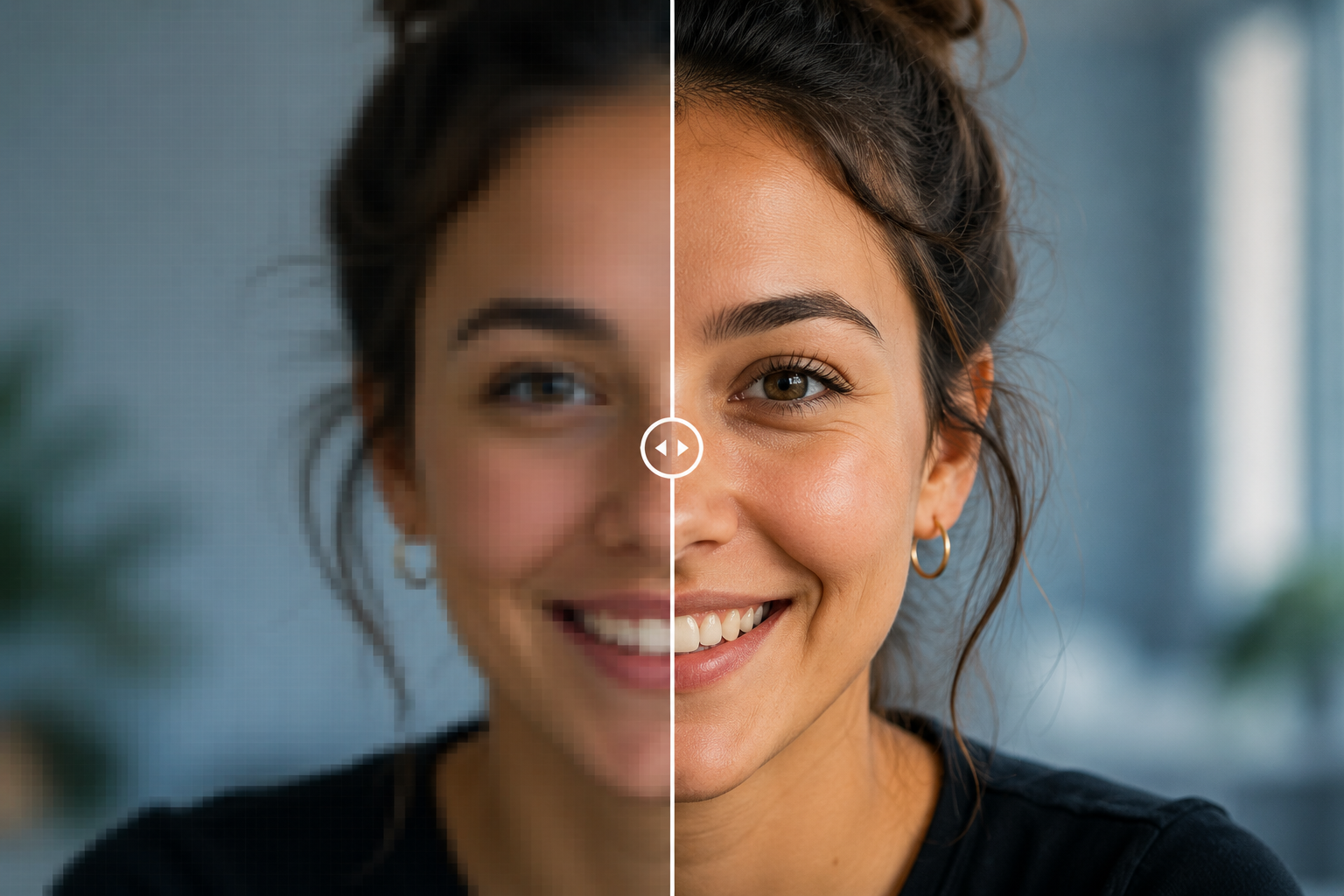
The best AI image enhancer tools in 2026 use deep learning to add realistic detail to blurry or low-resolution photos, turning small, grainy images into sharp, high-resolution versions without losing natural texture.
Some of these tools are completely free.
Others charge a monthly fee for extra resolution, batch processing, or business features.
This guide breaks down the best AI image enhancer tools available right now, what each one is actually good at, and how to pick the right one for your photos.
If you create content for a living, a good AI image enhancer tool can save you hours of reshooting and editing.
We strongly recommend that you check out our guide on how to take advantage of AI in today’s passive income economy.
Table of Contents
Why You Might Need an AI Image Enhancer
Old family photos lose quality over time.
Product photos taken on a phone often come out soft or grainy.
Blog thumbnails and YouTube covers look weak when they are stretched or zoomed.
This is exactly where the best AI image enhancer tools step in.
They use neural networks trained on millions of images to rebuild missing detail, rather than just stretching pixels like old-school resizing tools.
That means sharper edges, cleaner textures, and images that hold up even when printed large.
Whether you are fixing an old scan or preparing a product photo for an online store, the right AI image enhancer tool makes a real difference.
The tools below were chosen because they are widely used, well reviewed, and easy to test for yourself.
👉Free download: Start a 1-Person Business With Claude AI — Free Quick-Start Guide
How AI Image Enhancer Tools Actually Work
Most tools in this space use one of two approaches.
The first is a model called ESRGAN, short for Enhanced Super-Resolution Generative Adversarial Network.
It works using two competing systems, one that builds the larger image and one that checks the result for realism, and this back-and-forth process pushes the output toward a natural, photo-like finish.
The second approach is diffusion-based upscaling, a newer method used by tools like Magnific AI, which can add convincing new detail such as textures, facial features, or background elements that were not clearly visible in the original photo.
Because of this, the best AI image enhancer tools now offer two distinct modes.
Faithful upscaling stays close to the original photo and simply sharpens it, which works well for product photos, documents, and scanned images.
Creative upscaling lets the AI invent extra detail, which suits AI-generated art, old photographs, and creative projects where a little embellishment is welcome.
Best Free AI Image Enhancer Tools in 2026
Not everyone wants to pay a subscription just to sharpen a photo.
These free options are a solid place to start if you are testing the waters.
Upscayl
Upscayl is a free, open-source AI image enhancer tool that runs locally on your own computer instead of uploading your photo to a server.
In independent testing, Upscayl produced strong results with well-defined detail and natural, vivid color, making it one of the better free choices available.
If privacy matters to you, or you simply do not want to pay a monthly fee, Upscayl is considered one of the clearest recommendations among free tools.
It has no watermark and no credit system, since the processing happens on your device rather than in the cloud.
This makes it a genuinely useful AI image enhancer tool for anyone who edits a lot of personal or family photos.
The main tradeoff is that it needs a reasonably capable computer to run smoothly, since the AI model works locally.
Still, for a completely free AI image enhancer tool, the output quality holds up well against several paid competitors.
👉Get access to: The AI Blog Monetization Quickstart Guide
Enhancephoto.ai
Enhancephoto.ai is a browser-based tool that lets you upscale images from roughly 2K up to 16K resolution without creating an account.
Reviewers found the results surprisingly good for a free service, with textures that stay natural instead of looking artificially smoothed.
It works on both desktop and mobile, so you can enhance a photo directly from your phone.
This makes it a handy AI image enhancer tool for quick, one-off jobs where signing up for another account feels like overkill.
If you just need to fix a single image before posting it online, this is one of the fastest free routes available.
It will not replace a dedicated desktop tool for heavy, professional workloads.
But for casual use, it is one of the more convenient free AI image enhancer tools around.
Best Paid AI Image Enhancer Tools in 2026
If you enhance images regularly for business, a paid tool usually pays for itself in saved time.
Here are the standouts worth paying for.
Topaz Gigapixel AI
Topaz Gigapixel AI is a desktop application built specifically for enlarging photos, and it can scale images up to 16 times their original size while preserving fine detail.
It supports batch processing, letting you upscale roughly 20 images at once, along with different enhancement styles such as vivid, wild, and subtle.
Photographers and professionals often pick this as their go-to AI image enhancer tool because it consistently produces some of the best results for real photography.
It comes as a one-time purchase priced around $99, rather than a recurring subscription.
The main catch is that it requires installing desktop software and a reasonably powerful GPU, so it is less convenient than a browser tool.
Still, for anyone who takes photo quality seriously, this remains one of the most trusted AI image enhancer tools on the market.
👉Free download: The Claude AI Digital Product Starter Pack — 10 Done-For-You Prompts for Beginners
Let’s Enhance
Let’s Enhance is a browser-based AI image enhancer tool built with dedicated models for photos, product shots, AI-generated art, old scans, and illustrations.
You simply upload your image, pick the model that matches your content, choose a scale between 1x and 16x, and click enhance.
In one comparison test, Let’s Enhance produced the sharpest overall result, with clearly defined detail and natural, photographic surface texture.
It is particularly strong with product photography, handling text labels and fine print without distorting the letters, which is a common weak point for many other tools.
That makes it a favorite AI image enhancer tool among e-commerce sellers and marketing teams working through large batches of product images.
Pricing starts with a handful of free images, with paid plans beginning at around $9 a month.
Given the quality and the low starting price, it is one of the most practical AI image enhancer tools for small businesses.
Adobe Photoshop Generative Upscale
Adobe added a feature called Generative Upscale directly inside Photoshop, combining three separate AI models into one workflow.
It blends Firefly Upscaler for restoring low-resolution images, Topaz Gigapixel for preserving existing detail, and Topaz Bloom for adding new, creative detail.
Because it lives inside Photoshop, you can upscale, retouch, and export a photo without ever leaving the app.
This makes it an efficient AI image enhancer tool for anyone who already works inside the Adobe ecosystem daily.
It is not a standalone free tool, since it requires an active Photoshop subscription to use.
But for professional editors, having the enhancer built into the same software they already use saves a genuine amount of time.
If your workflow already runs through Adobe, this is likely the simplest AI image enhancer tool to add.
Magnific AI
Magnific AI takes a more creative approach than most other tools on this list.
Instead of only preserving what is already in your photo, it leans into generative enhancement, adding new detail that was never in the original image.
This makes it especially popular for enhancing AI-generated art, where a bit of extra imagination in the output is actually a benefit rather than a flaw.
It is considered one of the more aggressive AI image enhancer tools available, so it suits creative projects better than strict product photography.
If you need a photo to stay perfectly faithful to reality, this may not be the right pick.
But if you want a striking, polished final image, Magnific AI consistently delivers strong, eye-catching results.
👉Get access to the full package: Start a 1-Person Business With Claude AI
Mobile and Quick-Use AI Image Enhancer Tools
Pixelcut
Pixelcut bundles AI upscaling together with other social media editing tools in one app.
Reviewers note it works well for social platforms but caps out around 4x enlargement, and quality can dip slightly on very complex images.
It is best suited to social media managers who need a quick AI image enhancer tool on the go rather than a heavyweight desktop workflow.
HitPaw FotorPea
HitPaw FotorPea is a desktop AI enhancer for Windows and macOS that pushes images up to 4K, 8K, and beyond.
Along with upscaling, it combines denoising, colorization, and restoration in a single tool, and it sits inside a wider HitPaw suite that also covers video enhancement.
That makes it a flexible AI image enhancer tool for anyone who needs to fix old, damaged, or discolored photos, not just enlarge them.
How to Choose the Right AI Image Enhancer Tool for You
Start with what you actually need the image for.
If you are restoring a family photo or preparing a document, choose faithful upscaling tools like Let’s Enhance or Topaz Gigapixel, since they stay close to the truth of the original.
If you are polishing AI-generated art or want a bit of creative flair, Magnific AI’s generative approach may suit you better.
If budget is the main concern, Upscayl gives you strong results without any ongoing cost.
It also helps to test your actual image types before committing to a paid plan, since quality can vary between photos, illustrations, and logos.
Most services offer a free trial or a handful of free credits, so there is rarely a reason to pay before testing the output yourself.
Comparing a 2x and a 4x result on the same photo across two or three tools is usually enough to tell you which one fits your style.
Using Enhanced Images to Grow a Content Business
If you create digital products, blog content, or YouTube thumbnails, sharp images are not just cosmetic.
They directly affect how professional your brand looks and how much people trust what you are selling.
Once your images are enhanced, the next step is turning that content into consistent income.
👉Get access to: The AI Blog Monetization Quickstart Guide
This guide walks through practical ways to turn a blog, built with clean, high-quality visuals, into a steady revenue stream.
Pairing strong images with a clear monetization plan is often the difference between a blog that grows and one that stalls.
If you are just starting out and want a simple roadmap for building an AI-powered content or product business, this resource is worth a look.
👉Free download: Start a 1-Person Business With Claude AI — Free Quick-Start Guide
Final Thoughts
There is no single best AI image enhancer tool for every situation.
Upscayl is a great free starting point for personal photos.
Let’s Enhance and Topaz Gigapixel lead the pack for product photography and professional work.
Magnific AI and Adobe’s Generative Upscale suit creative and AI-art workflows best.
The smartest move is to test two or three of the best AI image enhancer tools on your own photos before settling on one.
Once you find the one that fits your workflow, sharp, high-quality images become one less thing to worry about.
👉Get access to the full package: Start a 1-Person Business With Claude AI
We strongly recommend that you check out our guide on how to take advantage of AI in today’s passive income economy.