How I Used Claude Code to Build a Full Recipe App With AI Features in Under 1 Hour
The Recipe App Idea That Changed How I Think About Building Products
Building a profitable Claude Code recipe app from scratch used to sound like something only developers with years of training could pull off.
But in 2026, that story has completely changed.
You do not need to know how to write Python, JavaScript, or any other programming language to ship a real mobile app with real AI features.
What you need is a clear system, the right tools, and a conversation-based workflow that lets Claude do the heavy lifting while you focus on what you want to build.
This article breaks down that exact system — from the first planning prompt all the way to testing the app on a real phone.
Everything you see here is based on a real build session using Claude Code, Claude Design, and Expo React Native — and the entire process took less than a couple of hours from idea to working prototype.
If you have ever wondered whether you could build a real app without a technical background, this is the article that shows you it is absolutely possible in 2026.
We strongly recommend that you check out our guide on how to take advantage of AI in today’s passive income economy.
Table of Contents
Why a Recipe App Is One of the Smartest App Ideas Right Now
Before jumping into the build process, it is worth understanding why a Claude Code recipe app is such a strong business opportunity in the current market.
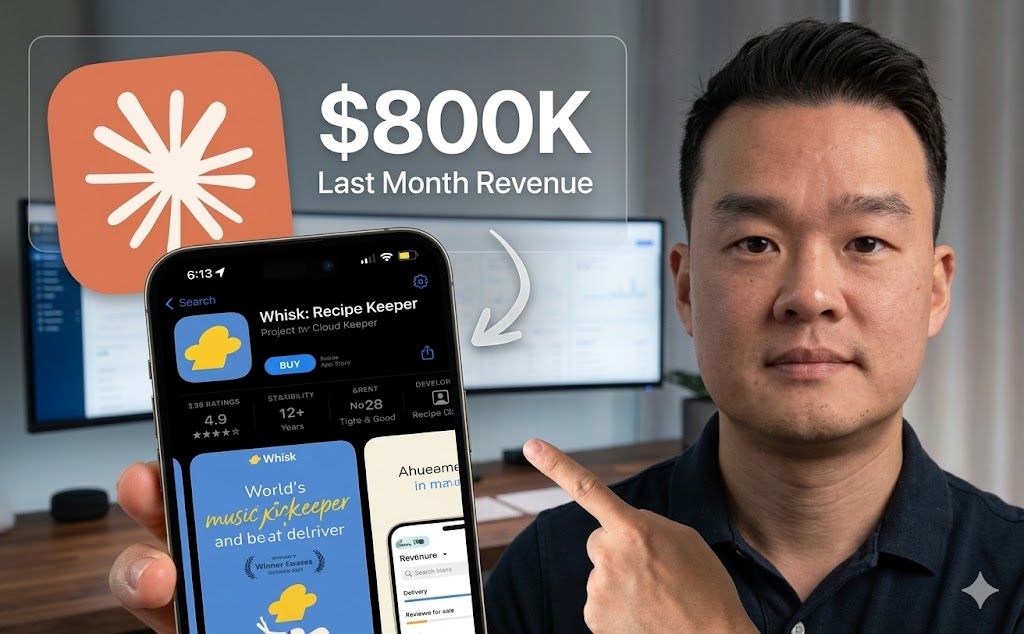
Apps like Réciproque — a recipe saving and organizing app — are currently generating around $800,000 every single month in recurring revenue.
That number is not a typo, and it is not a fluke.
The reason apps like this perform so well comes down to two powerful forces — recurring revenue and stickiness.
Once a user saves 20 or 30 recipes inside your app, they become emotionally invested in the product.
If they cancel their subscription, they lose everything they built, which means churn stays low and retention stays high naturally.
Another strong example is Cookpad, a recipe app that was built specifically for the Japanese market and is currently pulling in around $900,000 per month.
That proves that niching down — targeting a specific culture, diet, or demographic — does not shrink your opportunity. It can actually make you more competitive.
The Business Math Behind a Recipe App Exit
There is also a strong case for building one of these apps as an asset to eventually sell.
Platforms like Acquire.com, Flippa, and Empire Flippers regularly list app businesses at two to four times their annual profit.
If your app hits a 50 percent margin on $800,000 per month, that is $400,000 in profit monthly, which adds up to $4.8 million per year.
Even at a conservative 2x multiple, that is a potential exit of close to $10 million.
That kind of outcome is now accessible to non-technical builders because of tools like Claude Code — and the recipe app vertical is one of the best places to start.
The Two Tools Behind the Entire Build
The system used to build this Claude Code recipe app relied on two primary tools working together.
The first tool is Claude Design, which handles everything you see on the screen — the layout, the colors, the buttons, the card styles, and the overall visual feel of the app.
The second tool is Claude Code, which is the desktop application from Anthropic that handles the backend — the logic, the AI features, the API connections, and all the functional parts of the app.
Think of Claude Design as the architect who draws the blueprint and makes it beautiful, and Claude Code as the contractor who comes in and makes everything work.
The reason this two-tool workflow is so powerful is that Claude Design consistently produces high-fidelity app designs — getting you to about 95 percent of your intended visual — while Claude Code wires everything up without you ever touching a line of code yourself.
These two tools communicate with each other seamlessly, and the handoff between them is clean and straightforward.
Setting Up Claude Code the Right Way
Claude Code is available as a downloadable desktop application from Anthropic.
You will need at least the $20 per month Claude Pro subscription to access it, and once you are inside you will see three tabs — Chat, Co-Work, and Code.
For serious app building, you want to work inside the Code tab because it is the most capable environment for complex builds.
The first thing you want to do before writing a single prompt is to create a dedicated folder for your project on your computer.
Every file, design asset, and reference image for the build should live inside that folder.
This keeps your project organized and makes it easier for Claude to understand the full context of what you are building as the session moves forward.
Planning Your App Features Before You Build Anything
One of the biggest mistakes people make when building their first Claude Code recipe app is jumping straight into prompting without a clear plan.
If you skip the planning stage, Claude will make assumptions about what you want — and those assumptions will cost you time and tokens as you keep regenerating outputs that miss the mark.
The smarter approach is to start by pasting the App Store URL of a similar app into Claude and asking it to analyze the page and suggest the full feature set you should build.
Claude will come back with a detailed breakdown covering everything from universal recipe import and manual entry to cook mode, a built-in timer, shopping list generation, and calorie estimation.
From that list, you pick the features you want — typically the first seven or eight to start — and ask Claude to format them into a detailed, copy-paste-ready prompt for the design phase.
This planning prompt becomes the foundation of your entire build and gives every tool you use downstream a clear picture of what needs to exist in the final product.
Choosing the Right Claude Model at Each Stage
Claude Code gives you access to multiple AI models, and knowing which one to use at each stage of your build will save you tokens and produce better results.
During the planning and architecture phase, use Claude Opus 4 — it is the most capable model for reasoning through complex app structures and thinking deeply about feature dependencies.
Once the plan is finalized and you move into the active build phase, switch to Claude Sonnet 4.5 because it is significantly faster and uses fewer tokens per output without sacrificing quality on execution tasks.
If you are on the $20 plan, this model-switching strategy will stretch your usage much further throughout a full build session.
Designing the App With Claude Design
With your feature prompt ready, the next step in the Claude Code recipe app build is bringing the design to life inside Claude Design.
To access Claude Design, go to claude.ai in your browser and look for the Design option in the left sidebar navigation.
Once you are on the Design page, create a new project — give it a name like Recipe Snap — select the high-fidelity option, and paste in the full feature prompt you generated in Claude Code.
Before you hit send, there is one more step that dramatically improves the quality of the output.
Go to Pinterest and search for recipe app designs, pick one that matches the visual direction you have in mind, save the image to your project folder, and attach it as a design reference inside Claude Design.
This combination of a detailed feature prompt plus a visual reference image is what pushes the output quality to that 95 percent mark.
Claude Design will build out every screen — the home page, the library view, the individual recipe card, the shopping list, the settings page, and even the paywall — in about four to five minutes.
What the Finished Design Looks Like
Imagine opening a clean mobile app interface with a deep green color palette running throughout every screen.
The home page displays a prominent button to scan a recipe and a second button to paste in a URL, both sitting below a header with the app name in a modern sans-serif font.
If you tap into the library, you see recipes organized by meal type — breakfast, lunch, dinner, snacks — each displayed as a card with a photo, a prep time badge, and a cook time badge.
Tapping a recipe opens a full detail view with ingredients listed in a scrollable format, step-by-step instructions below, and a bright Cook Mode button at the bottom that activates a large-text display optimized for reading while you cook.
The shopping list screen pulls items automatically from any recipe you add to your cart, and the settings screen includes measurement unit toggles, dark mode, and an upgrade to Pro section.
Claude Design also gives you instant color variants — Rust, Ocean, Plum, Sage — that apply globally across every screen in one click, so you can test different brand directions without rebuilding anything.
Bringing the Design Into Claude Code to Build the Backend
Once you are happy with the design, download the project as a ZIP file from Claude Design, unzip it, rename the folder something descriptive like Recipe Snap Design, and move it into your main project folder.
Now go back to Claude Code and paste in a build prompt that references the design folder and specifies the technical setup you want.
The recommended stack for a Claude Code recipe app like this one is Expo React Native with TypeScript for the mobile front end, local device storage for saving recipe data, and a small Node.js Express backend to handle AI API calls — which keeps your API keys safely off the user’s phone.
Claude Code will analyze the design files, build every screen from them, wire up the navigation, and launch a live preview panel on the right side of the desktop app where you can click through the entire experience in real time.
The build typically takes around five to six minutes depending on the number of screens, and the result is a fully functional app prototype that mirrors the design you created almost perfectly.
Adding the Make It Healthier AI Feature
One of the most impressive additions to this Claude Code recipe app is a feature called Make It Healthier — and it takes about two minutes to implement.
You simply ask Claude to build a button on each recipe detail page that, when tapped, sends the current ingredient list to OpenAI and returns a healthier substitution list in place of the original.
The example Claude generates swaps spaghetti for whole grain spaghetti and heavy cream for Greek yogurt — small changes that feel genuinely useful to health-conscious users.
There is also a Tap to Revert button that brings back the original version, which is a small detail that makes the feature feel polished and intentional.
Features like this — powered by a quick AI call — are exactly what separate a generic recipe app from one that feels smart and worth paying for every month.
Connecting the OpenAI API for Live AI Functionality
To make the AI features of your Claude Code recipe app actually work in production, you need to connect the OpenAI API.
Start by going to platform.openai.com and adding credits to your account — this is a pay-as-you-go system, not a monthly subscription, so you only spend money when users actually trigger an AI call.
For a recipe scanning feature that uses image extraction, the cost per scan using GPT-4o mini is approximately half a cent.
At scale, 100 image scans costs somewhere between $0.50 and $1.00, and 1,000 scans runs between $5.00 and $10.00 — margins that make the business model extremely attractive when you are charging $10 per month per user.
Once you have funded your account, generate a new secret API key, copy it, and go back to Claude Code.
Ask Claude to create a .env environment file in the backend folder of your project and show you how to access it — then paste your API key inside that file and save it.
This keeps the key out of the chat history and out of any public-facing code, which is critical for security before you ever ship the app to real users.
Testing the App on a Real Phone With Expo Go
The moment you see your Claude Code recipe app running on an actual device is genuinely exciting — and getting there takes about two minutes once your build is complete.
Download the Expo Go app from the App Store or Google Play Store on your phone.
Back in Claude Code, ask it to generate a QR code for your Expo preview — Claude will compile the QR and display it as a PNG file in your project output.
Open your phone’s camera, point it at the QR code, and tap the link that appears.
Expo Go will launch and load your full app directly onto your phone without any App Store submission or developer account needed at this stage.
You can now browse every screen, tap every button, scan a physical recipe by taking a photo, paste in a YouTube URL to extract a recipe automatically, and test the Make It Healthier feature with a live API call running in real time.
The scanner successfully reads handwritten recipe cards and formats them into clean digital cards — and the URL extraction even pulls in the hero image from the linked website automatically, which adds a professional visual touch to every imported recipe.
Getting the App Ready for the App Store
Before you submit your Claude Code recipe app to the Apple App Store or Google Play, there are roughly 18 technical and compliance checkpoints that builders commonly miss — and missing them is the most common reason vibe-coded apps get rejected.
These include things like proper API key security (never hardcoded), robust error handling for network failures, privacy policy compliance for user data collection, App Store screenshot formatting, and proper permission request flows for camera and photo library access.
You also need three external services to make the app production-ready for paying users.
The first is Supabase, which is a free and open-source backend platform that stores all user recipe data in a secure cloud database — Claude Code knows how to integrate Supabase without any manual configuration.
The second is RevenueCat, which is the industry-standard tool for managing in-app subscriptions on both iOS and Android — Apple-approved and easy for Claude Code to wire up.
The third is an Apple Developer Account, which costs $99 per year and lets you publish unlimited apps to the App Store for the duration of that subscription.
Marketing Your Recipe App Without a Big Budget
Building a great Claude Code recipe app is only half the equation — getting paying users is where the real work happens, and it is arguably more important than the build itself.
The most effective marketing channel for consumer apps in 2026 is short-form video, specifically TikTok and Instagram Reels.
Apps like Réciproque grow their user base through a steady stream of UGC-style videos that follow a simple format — someone shows a problem (manually copying a recipe, managing a messy notes app), and then shows the app solving it in about 10 seconds.
You have three realistic options for producing this content at scale.
Option 1 — Create Your Own TikTok Content
The most cost-effective option is to create your own TikTok account and post videos demonstrating the app in real everyday situations.
This approach takes consistent effort but costs nothing upfront, and a single viral video can flood your app with thousands of free downloads overnight.
The tradeoff is time — you need to be posting regularly and iterating on what resonates with your audience.
Option 2 — Pay UGC Creators for Videos
The second option is to hire UGC creators on platforms like Billo or Insense to film short videos promoting your app for a fixed fee per video.
You pay once, the video lives online permanently, and it continues bringing in users long after the initial spend.
This model scales well because you can test multiple creators, multiple hooks, and multiple formats without committing to a large ad budget upfront.
Option 3 — Use AI UGC Tools to Produce at Scale
The third and most scalable option in 2026 is using AI-generated UGC tools like HeyGen or Arcads to produce high volumes of realistic persona-driven videos without hiring any human creators.
Successful app companies are currently running multiple TikTok accounts with different AI personas, testing dozens of video formats in parallel, and then putting paid ad spend behind whichever videos show early signs of viral traction.
This is the exact playbook that apps in the $800K per month range are using to acquire users — create at volume, identify what works, then scale it with money.
Final Thoughts on the Claude Code Recipe App System
The Claude Code recipe app system covered in this article represents the most accessible, fastest, and most financially rewarding way to build a mobile app in 2026.
You start with a validated idea — a recipe app with AI-powered import, scanning, and ingredient substitution — and you use Claude Code plus Claude Design to go from concept to working prototype without writing a single line of code yourself.
The technology stack is solid: Expo React Native for cross-platform mobile support, OpenAI’s GPT-4o mini for affordable AI processing, Supabase for backend data storage, and RevenueCat for subscription management.
The business model is proven: recurring monthly subscriptions, high stickiness through accumulated user data, and a clear path to a multi-million-dollar exit if you choose to sell.
And the marketing path is clear: short-form video content, UGC creators, and AI persona tools that let you produce and test at scale without a massive budget.
Everything in this system is available to you today, in 2026, regardless of your technical background — and the tools keep getting better with every month that passes.
If you have an app idea sitting in a notes app somewhere, this is your sign that the barrier between idea and launched product has never been lower than it is right now.
We strongly recommend that you check out our guide on how to take advantage of AI in today’s passive income economy.